What Is Framer? Things You Need To Know
Learn what Framer is, a modern web design tool to create, animate, and publish responsive websites without coding. Perfect for designers and startups.

Framer is a modern, all-in-one design and website building platform that allows designers and developers to create interactive, high-performance websites without needing to rely heavily on traditional coding.
Originally launched as a prototyping tool, Framer has evolved into a powerful no-code/low-code website builder, combining design, animation, CMS, and publishing into a single seamless workflow.
What is Framer?
Framer is a web-native design and publishing platform that allows designers to create real, responsive websites and publish them instantly without relying on a traditional development workflow.
Unlike tools that only focus on visual design, Framer is built around the idea that what you design should behave like a real website from the beginning. It combines layout control, responsiveness, animation, content management, and hosting inside one system. This reduces the gap between design and launch.
In simple terms, Framer helps you design and ship a website in the same place.
Framer didn’t start as a no-code builder. It has gone through multiple transformations:
Early Days: A developer-focused prototyping tool using JavaScript
Framer X: Introduced visual design capabilities with React-based components
Modern Framer: A full-fledged website builder competing with tools like Webflow and Wix
Today, Framer is widely used for landing pages, portfolios, SaaS websites, and startup sites.
Who Should Use Framer?
Framer is perfect for:
Designers → Want to turn designs into live websites
Startups → Need fast landing pages
Freelancers → Build client websites quickly
Marketers → Launch campaigns without developers
Understanding Framer’s Core Idea
For many years, digital workflows were divided into two stages. Designers created high-fidelity layouts in a design tool, and developers later rebuilt those layouts in code. Even in smooth workflows, small differences appeared during implementation. Spacing shifted, animations behaved slightly differently, and responsiveness required additional interpretation.
Framer was built to reduce that friction.
When you design inside Framer, you are not building a static mockup. You are building something that already understands layout rules, breakpoints, interaction behavior, and publishing logic. This changes how designers think. Instead of focusing only on visuals, they begin to consider structure and real web behavior from the start.
⚔️ Framer vs Other Website Builders
Feature | Framer | Webflow | Wix |
|---|---|---|---|
Ease of Use | ⭐⭐⭐⭐☆ | ⭐⭐⭐☆☆ | ⭐⭐⭐⭐⭐ |
Animations | ⭐⭐⭐⭐⭐ | ⭐⭐⭐⭐☆ | ⭐⭐⭐☆☆ |
Design Flexibility | ⭐⭐⭐⭐⭐ | ⭐⭐⭐⭐⭐ | ⭐⭐⭐☆☆ |
Performance | ⭐⭐⭐⭐⭐ | ⭐⭐⭐⭐☆ | ⭐⭐⭐☆☆ |
Developer Control | ⭐⭐⭐⭐☆ | ⭐⭐⭐⭐⭐ | ⭐⭐☆☆☆ |
Most Useful Features of Framer
Framer includes many capabilities, but some are especially important for beginners and modern creators.
Responsive Layout System
Framer allows you to design for desktop, tablet, and mobile directly. Instead of manually resizing and adjusting everything, you define layout rules that determine how elements behave across breakpoints.
Containers resize automatically. Text reflows naturally. Sections adjust based on defined rules. This creates realistic, responsive behavior without needing CSS knowledge.
Stack Layout
One of the most important features in Framer is Stack. Stack works similarly to Flexbox in web development. It allows you to align items vertically or horizontally and control spacing easily.
Understanding Stack is essential because most layouts in Framer are built using it. Once you learn how Stack works, building clean, structured layouts becomes much easier.
Reusable Components
Framer allows you to create reusable components for buttons, sections, navigation bars, and more. This keeps your design consistent and makes updates easier. When you edit a component, changes apply everywhere it is used.
While Framer’s component system is not as deep as enterprise-level product design systems, it is more than enough for marketing websites and modern web projects.
Real Animations and Interactions
Framer allows designers to create smooth animations such as scroll effects, hover transitions, fade-ins, and page transitions. These interactions behave more like real web animations rather than simple design simulations.
This makes Framer particularly strong for storytelling websites, startup landing pages, and interactive portfolios.
CMS Explained Clearly
Framer includes a built-in Content Management System (CMS). A CMS allows you to manage structured content such as blog posts, portfolio projects, team members, or case studies.
Inside Framer, you create collections with custom fields. For example, a blog collection might include title, image, description, author, and slug fields. You then design a template page and connect it to the collection.
When you add new content to the collection, Framer automatically generates new pages using that template.
This removes the need for external CMS platforms for many projects. Everything stays inside Framer, which simplifies the workflow for beginners and small teams.
Built-In Hosting and Publishing
One of Framer’s strongest advantages is integrated hosting.
After designing your website, you can connect a custom domain and publish instantly. Framer handles SSL, performance optimization, and infrastructure in the background. There is no need for separate hosting providers or deployment tools.
This makes Framer especially appealing to startups, freelancers, and agencies that want to launch quickly without technical setup.
Framer also includes SEO controls. You can manage page titles, meta descriptions, URLs, and indexing directly within the platform. This makes it practical for marketing and growth-focused websites.
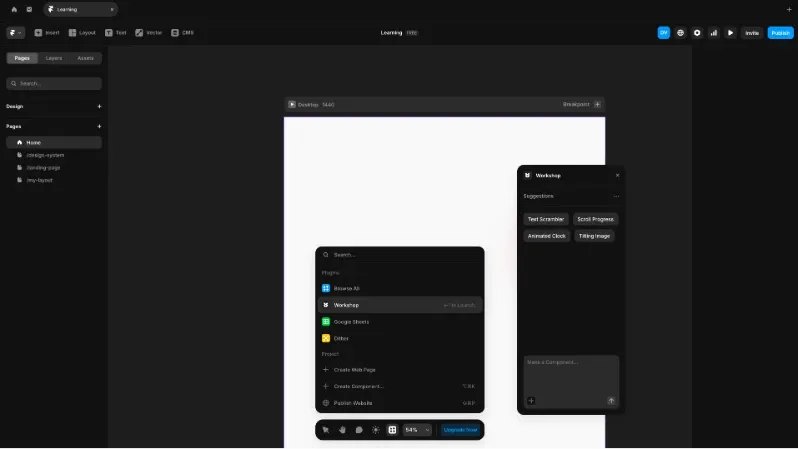
Framer AI Workshop
Framer Workshop AI enhances the component-building experience inside Framer by helping designers create structured layouts and reusable components more efficiently. It works as an intelligent assistant that speeds up repetitive setup tasks while keeping designers in control.
With Workshop AI, you can:
Generate structured layout sections such as hero blocks, feature grids, and content areas
Get content suggestions for headings, descriptions, and calls to action
Create responsive-friendly starting layouts that follow web logic
Speed up component setup inside Workshop
Workshop AI does not replace design thinking. It supports it. Designers still control layout behavior, responsiveness, and interaction logic - AI simply helps reduce mechanical work and improves workflow speed.
Why Framer Is Becoming More Popular in 2026
Framer’s growth in 2026 reflects broader changes in the design industry.
First, speed matters more than ever. Startups and marketing teams need to launch quickly and iterate frequently. Framer reduces the time between design and deployment.
Second, designers increasingly want independence. Many creators prefer not to rely heavily on developers for small website updates. Framer gives them that control.
Third, modern workflows prioritize responsive and performance-aware design. Framer encourages web-first thinking, which aligns with how websites actually function.
Finally, combining design, CMS, hosting, and publishing in one platform reduces complexity. Instead of using multiple tools, everything is integrated.
These reasons explain why Framer adoption continues to grow.
Who Should Learn Framer?
Framer is especially useful for:
Students learning web design
Designers building portfolios
Startup founders launching MVPs
Marketing teams are creating landing pages
Agencies building client websites
It is less suited for large enterprise product design systems or complex SaaS dashboards that require deep design governance. For those scenarios, tools like Figma remain stronger.
What Beginners Should Focus on First
If you are new to Framer, avoid trying to learn everything at once. Focus on core fundamentals. Start by mastering Stack and layout behavior. Understand how spacing and container resizing work. Next, practice designing for breakpoints. Build a simple page and adjust it for desktop, tablet, and mobile.
Then explore the CMS by creating a small blog collection and connecting it to a template. Finally, publish a project once. Going through the full design-to-live process builds confidence and clarity.
Once these fundamentals are comfortable, you can explore animations, advanced components, and performance optimizations.
Final Thoughts
Framer is not just another design tool. It is a web-native platform that integrates layout systems, responsiveness, animation, CMS functionality, workspace collaboration, and hosting into a single workflow.
Its strength lies in reducing friction between design and launch. It empowers designers to move from concept to live website quickly while maintaining control over structure and behavior.
In 2026, learning Framer means learning how modern websites are built - not just how they look.


