Filters
Featured
Filter by Categories
Framer Backgrounds - Free & Pro
Explore premium Framer Backgrounds designed to add depth, motion, texture, and personality to your website.
✅ Trusted by Great Companies & Customers


Silk Background
Free
Category:
Background
Silk Background
Free
Category:
Background

Root Background
Free
Category:
Texture
Root Background
Free
Category:
Texture

Arrow Background
Free
Category:
Mouse Traking
Arrow Background
Free
Category:
Mouse Traking

Metal Background
Free
Category:
Background
Metal Background
Free
Category:
Background

Cloud Background
Free
Category:
Mouse Traking
Cloud Background
Free
Category:
Mouse Traking
Silk Background
Free
Category:
Background
Cloud Background
Free
Category:
Mouse Traking
Metal Background
Free
Category:
Background
Arrow Background
Free
Category:
Mouse Traking
Root Background
Free
Category:
Texture
Silk Background
Free
Category:
Background
Arrow Background
Free
Category:
Mouse Traking
Cloud Background
Free
Category:
Mouse Traking
Root Background
Free
Category:
Texture
Metal Background
Free
Category:
Background
Best Value
All-Access
$149
$599
Unlimited access to every template, block, and component in the
Framespark ecosystem - with free lifetime updates.



Best Value
All-Access
$149
$599
Unlimited access to every template, block, and component
in the Framespark ecosystem - with free lifetime updates.
Best Value
All-Access
$149
$599
Unlimited access to every template, block, and component
in the Framespark ecosystem - with free lifetime updates.
Best Value
All-Access
$149
$599
Unlimited access to every template,
block, and component in the
Framespark ecosystem -
with free lifetime updates.
Explore Framer Backgrounds
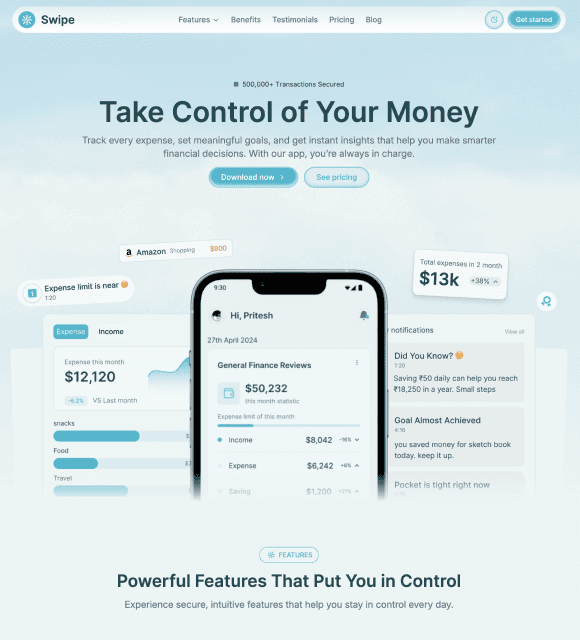
Make your Framer website feel more polished with carefully designed Framer Background effects. Add atmosphere to hero sections, create interactive experiences, highlight important content, or give simple layouts more visual depth.
Framespark backgrounds are built to work naturally with modern Framer websites. Add them to your canvas, customize their appearance, and combine them with your existing sections, components, and layouts.
What are Framer Backgrounds?
A Framer Background is a visual or interactive effect placed behind website content to create depth, atmosphere, and visual interest. It can be a soft glow, subtle texture, animated effect, mouse-responsive interaction, or click-based animation that makes a section feel more engaging.
Framespark makes these backgrounds ready to use inside Framer, so you can add an effect to your project and customize it to match your brand and layout. Use them behind hero sections, feature areas, portfolios, landing pages, CTAs, product showcases, and other sections where you want to create a stronger visual experience.
Why use Framer Backgrounds instead of building your own?
Creating custom background effects from scratch can take considerable design and development time. Framespark helps you add polished visuals faster while keeping control over the final design.
Add visual impact quickly.Transform a simple hero or landing page section with a glow, texture, or interactive effect without building the effect yourself.
Create more engaging experiences.Interactive backgrounds such as mouse tracking and click animations can make your website feel more dynamic and responsive.
Customize them to your brand.Adjust available colors, sizing, positioning, opacity, and other properties so the background complements your design.
Keep your design consistent.Use backgrounds from the same collection across different sections while maintaining a cohesive visual language.
How do Framer Backgrounds work?
The workflow is simple:
Find a background that matches the visual style or interaction you need.
Add it to your Framer project and position it behind your content.
Customize the effect using the available Framer controls.
Adjust the visual behavior to fit your layout and brand.
Publish your website with a polished and responsive background.
No complicated setup is required. If you can design in Framer, you can use a Framespark background.
Types of Framer Backgrounds
Framespark organizes its Framer Background collection into categories based on the type of visual effect.
Component
Background
Glow
Texture
Mouse Tracking
Click Animation
What It Does
Adds depth and atmosphere.
Adds soft light and glow effects.
Adds subtle visual texture.
Responds to cursor movement.
Adds click-based visual effects.
Best For
Hero sections, landing pages
Heroes, CTAs, showcases
Portfolios, feature sections
Interactive pages, portfolios
Buttons, interactive sections
New backgronds are added regularly, so the collection keeps growing.
Use cases: who Framer components are for
SaaS and startup builders can use glows, textures, and interactive effects to create stronger hero sections and polished product pages.
Designers and freelancers can add visual personality to portfolios and client websites without spending hours creating custom background effects.
Developers can use interactive and modern visual effects to make technical websites and product pages more distinctive.
Agencies can combine Framer Backgrounds with reusable sections and components to create unique client websites faster.
Creators and personal brands can use textures, glows, and interactive effects to make portfolios and landing pages more memorable.
Features of Framespark components
Ready to use in Framer - add backgrounds directly to your project without creating the effect from scratch.
Customizable - adjust available colors, sizing, opacity, positioning, and other properties.
Interactive effects - create engaging experiences with mouse tracking and click animations.
Responsive - designed to work across desktop, tablet, and mobile layouts.
Performance-focused - built with performance in mind for modern websites.
Easy to layer - place backgrounds behind text, images, cards, buttons, and other elements.
Modern visual styles - designed for contemporary Framer websites.
Reusable - use backgrounds across different sections and projects.
What makes Framespark Backgrounds different
Most component libraries hand you an element and leave you to it. Framespark builds each component conversion-first and performance-first, with CMS depth so your interactions scale with real content instead of static placeholders. These are the higher-value, technical pieces that make a Framer site feel genuinely custom - without the developer.
Pair your backgrounds with premium Framer Components, Framer Blocks, and Framer Templates to build a complete, polished website without starting from scratch.
FAQ Section
What is a Framer Background?
A Framer Background is a visual or interactive effect placed behind website content to add depth, atmosphere, movement, or visual interest. It can include effects such as glows, textures, mouse tracking, and click animations.
Do I need to know how to code?
No. Framespark backgrounds are designed to be used directly inside Framer without requiring you to write code.
Can I customize Framespark backgrounds?
Yes. You can customize available properties such as colors, sizing, opacity, positioning, and animation to match your design.
Are Framer Backgrounds responsive?
Yes. Framespark backgrounds are designed to adapt across desktop, tablet, and mobile layouts.
Where can I use a Framer Background?
You can use backgrounds behind hero sections, feature areas, portfolios, CTAs, product showcases, landing pages, and other website sections.
What types of backgrounds are available?
Framespark includes Background, Glow, Texture, Mouse Tracking, and Click Animation categories, giving you different ways to add visual depth and interaction.
Can Framer Backgrounds be interactive?
Yes. Mouse Tracking and Click Animation backgrounds can respond to user interactions and create more dynamic website experiences.
Will Framespark backgrounds affect website performance?
Framespark backgrounds are designed with performance in mind, helping you add visual effects without unnecessary complexity.
How do I add a Framer Background?
Choose a background, add it to your Framer project, position it behind your content, and customize its available settings to match your design.

Framespark
Everything you need to ship faster in Framer : Templates, Components, Sections, Backgrounds and more.
Official Framer Creator
Resources
Help and Support
Framespark Templates
Framespark
Everything you need to ship faster in Framer : Templates, Components, Sections, Backgrounds and more.
Official Framer Creator
Help and Support
Resources
Framespark Templates
Framespark
Everything you need to ship faster in Framer : Templates, Components, Sections, Backgrounds and more.
Official Framer Creator
Help and Support
Resources
Framespark Templates
Framespark
Everything you need to ship faster in Framer : Templates, Components, Sections, Backgrounds and more.
Official Framer Creator
Resources
Help and Support
Framespark Templates
©2026 Framespark, Powered by Clevision


Polar

©2026 Framespark, Powered by Clevision
Polar