Filters
Featured
Filter by Template
Framer Menu Components
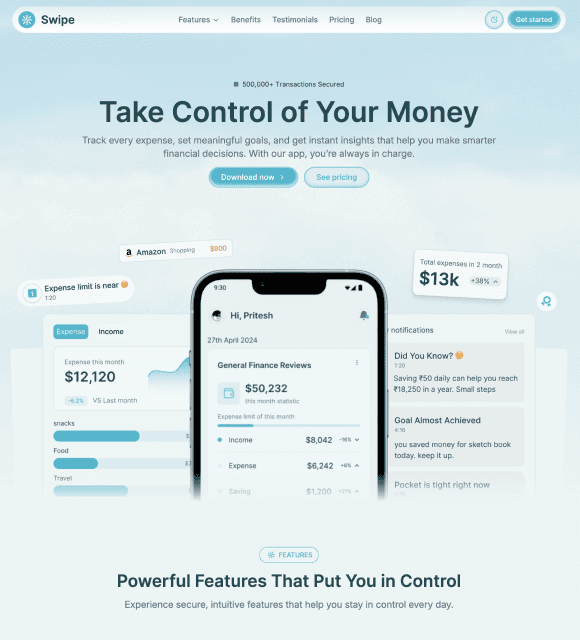
Menu Components are reusable UI components that create responsive navigation menus, dropdowns, and mobile-friendly navigation experiences.
✅ Trusted by Great Companies & Customers


Best Value
All-Access
$149
$599
Unlimited access to every template, block, and component in the
Framespark ecosystem - with free lifetime updates.



Best Value
All-Access
$149
$599
Unlimited access to every template, block, and component
in the Framespark ecosystem - with free lifetime updates.
Best Value
All-Access
$149
$599
Unlimited access to every template,
block, and component in the
Framespark ecosystem -
with free lifetime updates.
Framer Menu
Framer Menu is a reusable Framer Component that helps you create modern, intuitive, and responsive navigation menus for websites of all sizes. Whether you're building a SaaS landing page, ecommerce store, portfolio, agency website, or documentation platform, a well-designed menu helps visitors quickly find information while improving usability and user experience.
Built for Framer's visual editor, the Menu component is fully customizable without writing code. From simple navigation menus and dropdowns to mobile hamburger menus and multi-level navigation systems, Framer Menu helps you organize your website while maintaining a clean and professional design.
What is Framer Menu?
Framer Menu is a UI component that displays a collection of navigation links, actions, or categories in an organized and accessible layout. It allows users to navigate between pages, access important sections, and discover content without confusion.
Unlike a complete navigation system that may include branding, search bars, and CTAs, the Menu component focuses specifically on presenting navigation items in a structured and user-friendly format.
A typical Framer Menu includes:
Navigation links
Dropdown menus
Mobile hamburger menu
Nested menu items
Active menu states
Responsive layouts
Smooth menu animations
Built using reusable Framer Components, every Menu component can be customized to match your brand while keeping your navigation consistent across your website.
Why Use Framer Menu Component?
A well-designed menu improves navigation, reduces user frustration, and helps visitors discover more content with fewer clicks.
Simplify Website Navigation: Help visitors quickly access pages, categories, and important content.
Built for Framer: Customize every Menu component using reusable Framer Components without writing code.
Improve User Experience: Create intuitive navigation that makes websites easier to explore.
Fully Responsive: Deliver seamless menu interactions across desktop, tablet, and mobile devices.
Support Complex Navigation: Build dropdown menus, nested navigation, and mobile-friendly menu systems.
Modern UI Design: Enhance your website with clean, organized, and visually appealing navigation layouts.
SEO-Friendly Website Structure: Well-organized menus help users and search engines understand your website hierarchy.
Features
Responsive Menu Layouts: Automatically adapt menus across desktop, tablet, and mobile devices.
Dropdown Support: Organize multiple pages and categories using expandable navigation menus.
Hamburger Menu: Create clean mobile navigation for smaller screens.
Multi-Level Navigation: Display nested pages and categories with structured menu systems.
Active Menu States: Highlight the current page to improve navigation clarity.
Smooth Animations: Add polished open, close, and dropdown transitions.
Easy Customization: Edit menu items, typography, spacing, colors, icons, and layouts directly inside Framer.
Reusable Components: Maintain consistent navigation across your website using modular Framer Components.
Production Tips
A menu is one of the most frequently used components on a website. Following these best practices helps create a smooth browsing experience.
Keep menu items short and descriptive.
Limit the number of top-level navigation items whenever possible.
Group related pages into dropdown menus for better organization.
Ensure mobile menus are easy to open and close.
Clearly highlight the active page.
Maintain consistent menu placement across every page.
Use accessible spacing and clickable areas for touch devices.
Test menu interactions on desktop, tablet, and mobile before publishing.
Integration With Other Components
A Framer Menu component works naturally with a Framer Navigation component to create a complete website navigation system. While the Navigation component manages the overall header and layout, the Menu component organizes links, dropdowns, and categories to make browsing simple and intuitive.
For documentation websites and resource centers, pairing Menu with a Framer TOC component allows visitors to navigate both between pages and within long-form content. If your website supports multiple themes, integrating Framer Light & Dark Mode ensures your menu automatically adapts to light and dark appearances while maintaining visual consistency.
Adding Framer Motion Animation creates smooth dropdown transitions and mobile menu interactions, while a Framer FAQ component can complement support or help pages by allowing visitors to quickly access common questions after navigating to the appropriate section.
By combining these reusable Framer Components, you can build professional Framer Templates with intuitive navigation systems that improve usability, accessibility, and the overall browsing experience.

Framespark
Everything you need to ship faster in Framer : Templates, Components, Sections, Backgrounds and more.
Official Framer Creator
Resources
Help and Support
Framespark Templates
Framespark
Everything you need to ship faster in Framer : Templates, Components, Sections, Backgrounds and more.
Official Framer Creator
Help and Support
Resources
Framespark Templates
©2026 Framespark, Powered by Clevision


Polar

©2026 Framespark, Powered by Clevision
Polar