How to Choose Rigth Framer Plan in 2026?
Check out Perfectly Explained Framer pricing plans. Compare Free, Basic, Pro, Scale, and Enterprise plans to choose the best option for your website and growth.

Building websites in Framer has become a significant part of my workflow over the past few years.
I've used Framer to launch startup landing pages, SaaS marketing websites, agency websites, personal brands, portfolios, blogs, and multilingual business websites. During that time, one question comes up repeatedly from clients, founders, and designers:
"Which Framer plan should I actually choose?"
On the surface, Framer's pricing looks simple.
But once you start building real projects, factors like CMS limits, bandwidth, localization, analytics, editor seats, and scaling costs become much more important than the monthly price itself.
I've seen companies overspend on plans they didn't need.
I've also seen teams hit limitations halfway through a website launch because they underestimated future content growth.
In this guide, I'll walk you through every Framer pricing plan from practical experience, explain who each plan is best suited for, and help you avoid expensive mistakes when choosing your plan.
Planning to build with Framer? If you're looking for professionally designed websites, explore our collection of Framer templates for startups, SaaS products, agencies, portfolios, blogs, and business websites. They're built to help you launch faster while following modern design and conversion best practices.
What Is Framer, and Why Does Its Pricing Matter?
Framer is a visual, no-code website builder that lets designers, founders, and marketing teams ship fast, animated, production-ready websites without writing code. It combines a design canvas, a built-in CMS, global hosting, and AI-assisted design tools in a single platform - which is why so many freelancers, startups, and agencies use it instead of stitching together separate design, hosting, and CMS tools.
Because Framer prices per site (not per account) and layers editor seats and add-ons on top of the base subscription, the number on the pricing page rarely equals what you actually pay each month. This guide breaks down every Framer plan, what's genuinely included, and the extra costs most quick comparisons skip - so you can budget accurately and choose the plan that fits your project, not just the cheapest headline price.
Framer Pricing Plans Overview
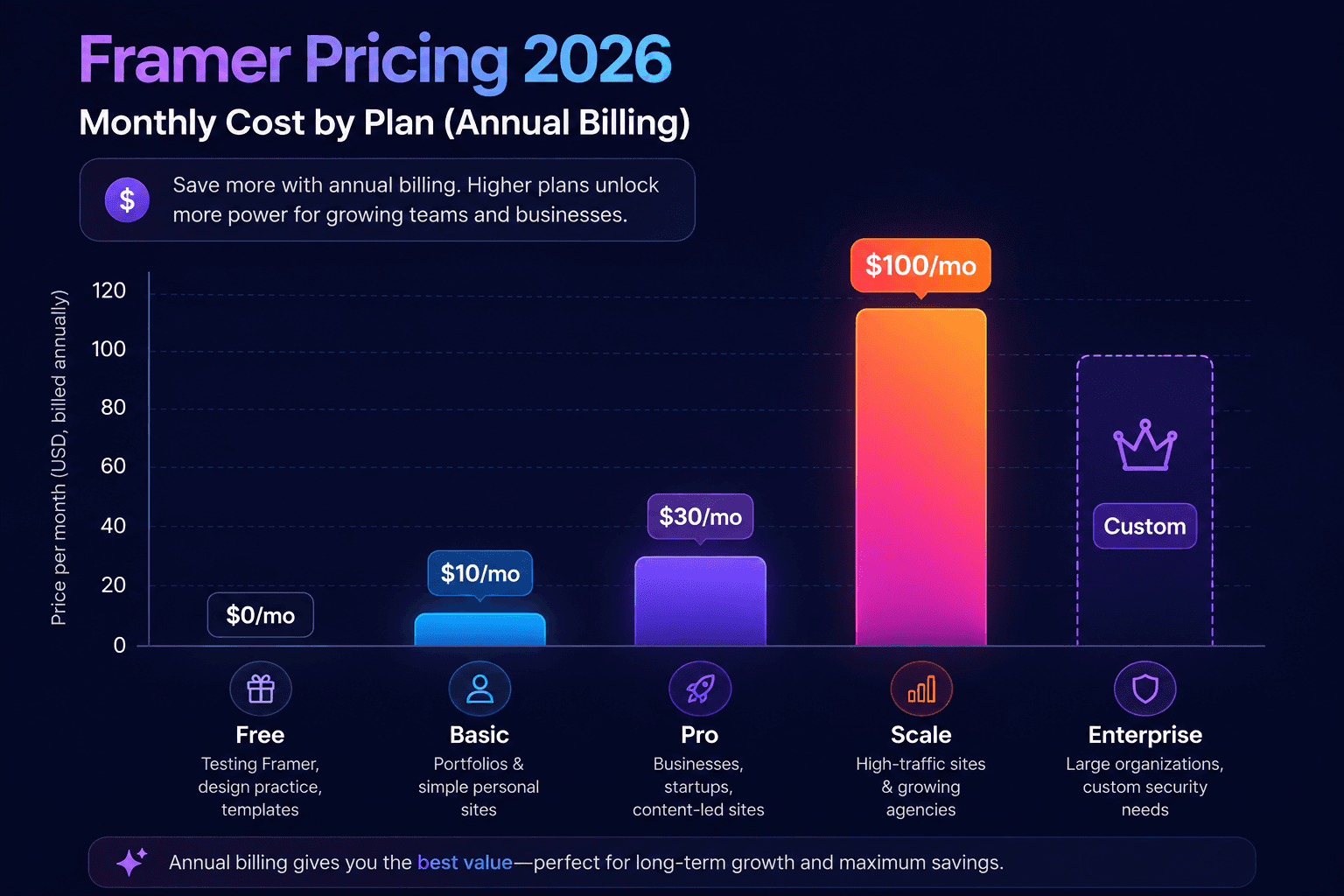
Here is the complete picture of Framer pricing in 2026:
Plan | Best For | Annual Billing | Monthly Billing |
|---|---|---|---|
Free | Testing Framer, design practice, templates | $0/month | $0/month |
Basic | Portfolios & simple personal sites | $10/month | $15/month |
Pro | Businesses, startups, content-led sites | $30/month | $45/month |
Scale | High-traffic sites & growing agencies | $100/month | Annual only |
Enterprise | Large organizations, custom security needs | Custom | Custom |
Framer Free Plan: $0/Month
The Free plan is Framer's no-commitment way to explore the editor, build templates, or design non-commercial projects. It's a genuinely capable design tool - the limits only bite once you try to publish a real business site.
What's Included in the Free Plan
Full access to the Framer design editor and AI design tools
Hosting on a framer.app subdomain (no custom domain)
Up to 1,000 pages and 10 CMS collections for building/testing
1 GB of monthly bandwidth
One free translation locale to try localization
Up to 3 collaborators on a workspace with no active subscription
Framer branding displayed on the published site
Free Plan Limitations
No custom domain - your site stays on a framer.app URL
Framer watermark/branding cannot be removed
Not viable for a live business site expecting real traffic
Who it's for: hobbyists, students learning Framer, and anyone prototyping a design before committing to a paid plan.
Framer Basic Plan: $10/Month (Annual) or $15/Month
Basic is the entry-level paid tier and the plan most personal sites and simple portfolios land on. It removes Framer branding, unlocks a custom domain, and adds just enough CMS capacity for a straightforward site.
What's Included in Basic
Free custom domain (including a free .com on annual billing)
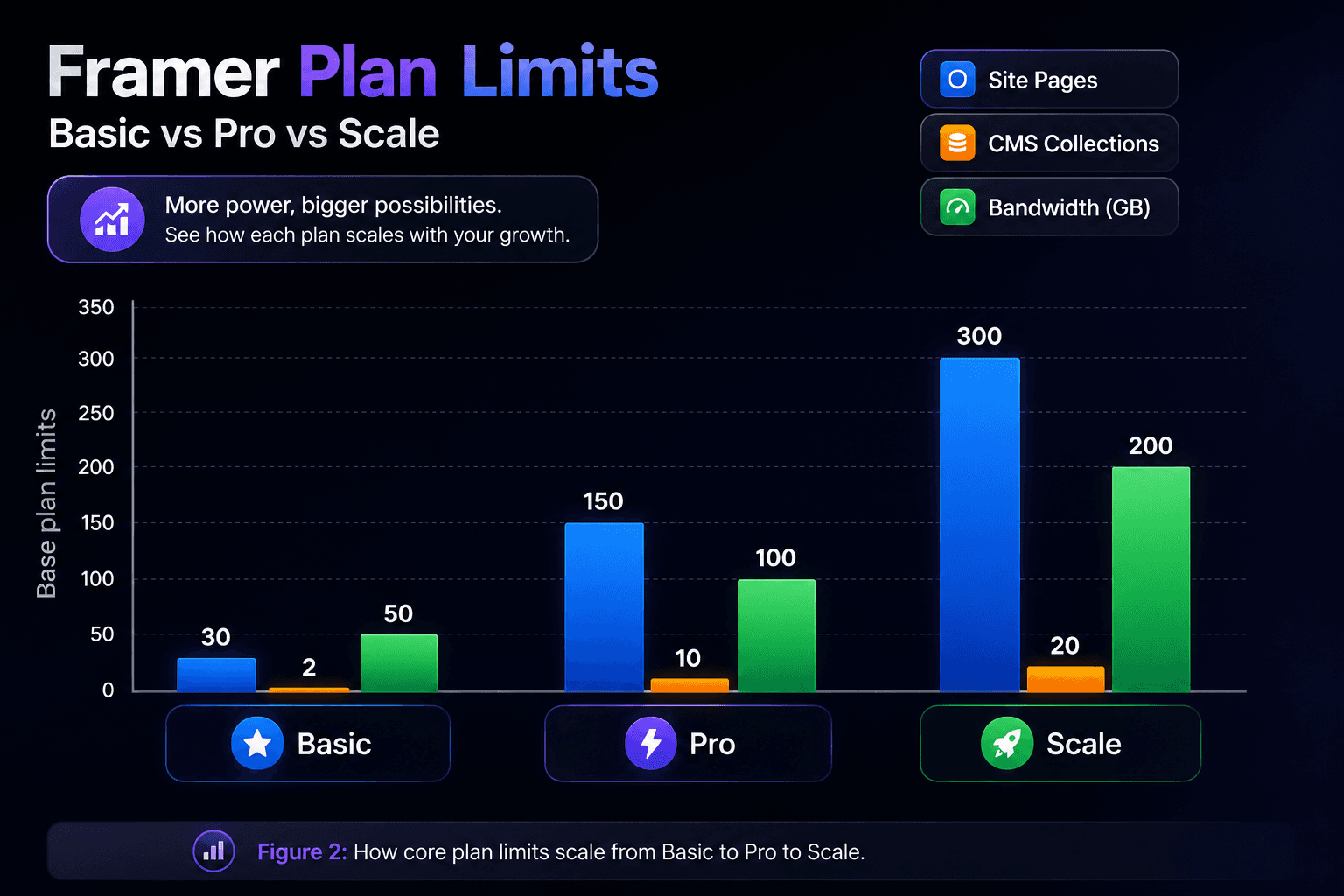
2 CMS collections and roughly 1,000 CMS items
Up to 30 site pages
50 GB monthly bandwidth
Built-in SEO tools and password protection
Hosting across 20+ global CDN locations
1 additional editor seat included, more available as an add-on
Where Basic Falls Short
Only 2 CMS collections - tight for a site with a blog plus, say, a team directory
No staging environment, so changes publish directly to the live site
30-page ceiling can be limiting for content-heavy sites
Who it's for: freelancers, students, and small studios publishing a single creative personal site or landing page.
Framer Pro Plan: $30/Month (Annual) or $45/Month
Pro is Framer's most popular plan for real businesses. It multiplies Basic's limits and adds the workflow features growing teams actually need - staging, redirects, and branching.
What's Included in Pro
10 CMS collections and roughly 2,500 CMS items
Up to 150 site pages (expandable to 700 with add-ons)
100 GB monthly bandwidth
Staging environment to test changes before publishing
Site redirects to preserve search rankings when URLs change
Branching with previews for safer collaboration
90-day analytics history
Optional add-ons: A/B testing (Convert) and advanced hosting
Why Most Businesses Choose Pro
The jump from Basic to Pro isn't just about limits - staging and branching mean you can test a redesign or new page without risking the live site, which matters the moment a website supports real revenue or lead generation.
Who it's for: agencies, startups, and scale-ups running their marketing site, blog, and campaign pages on Framer.
Framer Scale Plan: $100/Month (Annual Billing Only)
Scale is built for high-traffic marketing sites and larger agencies managing multiple client projects. It's billed annually only — there's no monthly option at this tier — and every core limit can be expanded further with usage-based add-ons.
What's Included in Scale
20 CMS collections (expandable to 40)
Up to 300 site pages (expandable to 700)
10,000 CMS items (expandable to 40,000)
200 GB bandwidth (expandable up to 2 TB)
Priority support and advanced CDN performance
A/B testing and funnels available via the Convert add-on
Up to 20 translation locales
Who it's for: high-traffic marketing sites, agencies running several client sites under one workspace, and businesses that need flexible, usage-based scaling rather than a hard plan ceiling.
Framer Enterprise Plan: Custom Pricing
Enterprise is for large organizations with compliance, security, or scale requirements that a self-serve plan can't cover. Pricing is negotiated directly with Framer's sales team.
What's Included in Enterprise
Unlimited editors and custom seat arrangements
Enterprise-grade security, SSO, and SCIM provisioning
Uptime guarantees and dedicated support
Custom limits on pages, CMS, and bandwidth
Custom billing, including annual contracts and bank transfer options
Who it's for: enterprises and mission-critical sites that need custom limits, dedicated support, and formal security documentation (SOC 2, ISO 27001) for procurement.
Editor Seats, Add-Ons & Hidden Costs
The base subscription is rarely the full bill. Framer charges separately for extra collaborators and several power features. Here's what to budget for:
Cost Item | Price | Notes |
|---|---|---|
Additional editor seat | $20/month | First editor included; applies to Basic and Pro |
Content editor seat | $10/month | CMS-only access, no full design permissions |
Extra translation locale | $20/month per locale | Basic includes up to 2, Pro up to 10, Scale up to 20 |
Convert (A/B testing) | $50 per 500,000 events | Available on Pro and Scale as an add-on |
Advanced hosting | $200/month | Multi-site setups and custom headers under one domain |
Extra CMS collections | From $40 per 10 | Pro and Scale, expandable up to plan maximum |
Extra bandwidth | From $40 per 100 GB | Applies once you exceed your plan's included bandwidth |
Viewers are always free, so inviting clients or stakeholders to review a site in read-only mode costs nothing - the charges only kick in when someone needs edit access.
Annual vs Monthly Billing: Which Saves More
Framer's annual billing consistently saves around 33% compared to paying month-to-month, and Scale is only available annually. The trade-off is commitment: annual plans are paid upfront for the year.
Plan | Monthly Price | Annual Price (per month) | Annual Savings |
Basic | $15/month | $10/month | ~33% ($60/year) |
Pro | $45/month | $30/month | ~33% ($180/year) |
Scale | Not available | $100/month | Annual commitment required |
Rule of thumb: if you expect the site to stay live for more than four to six months, annual billing almost always works out cheaper. Monthly billing only makes sense for short-term campaign sites or while you're still testing whether Framer is the right fit.
How to Choose the Right Framer Plan
Instead of picking a plan by price alone, work through these questions:
1. Do you need a custom domain?
If yes, you need at least Basic. The Free plan cannot connect a custom domain.
2. How much content will your site have?
A simple one-page portfolio fits comfortably in Basic. A blog, multiple content types, or a site with more than a couple of hundred pages needs Pro or Scale.
3. Will more than one person edit the site?
Basic and Pro include one editor seat; every additional collaborator is $20/month (or $10/month for content-only access). For a team of three or more, compare that add-on cost against simply upgrading tiers.
4. Do you need staging or safer publishing workflows?
If the site supports real revenue or leads, Pro's staging environment and branching are worth the upgrade - they let you test changes before they go live.
5. How much traffic are you expecting?
High-traffic campaigns or multi-site agency work will outgrow Basic's 50 GB bandwidth quickly. Scale's 200 GB (expandable to 2 TB) is built for this.
💡 Quick Recommendation
• Basic → Best for personal portfolios and one-page websites.
• Pro → Ideal for business websites, blogs, and client projects.
• Scale → Perfect for high-traffic websites and growing agencies.
• Enterprise → Built for large organizations with advanced security and compliance needs.
Conclusion:
Framer's pricing is straightforward at the surface - five clearly named plans - but the real cost depends on your team size, content volume, and traffic. For most solo creators, Basic covers a polished personal site. Growing businesses and agencies get the most value from Pro, thanks to staging and higher CMS limits. High-traffic or multi-site operations should budget for Scale, and large organizations with compliance requirements should talk to Framer's Enterprise team directly.
Before you subscribe, map your expected pages, CMS collections, bandwidth, and number of editors against the tables above - that's the fastest way to land on the right Framer plan without paying for headroom you'll never use.


