Framer Website Builder: Why Framer Is a Website Builder
Discover how Framer combines design, CMS, SEO, hosting, and AI to turn visual designs into fully functional websites.

Framer doesn't feel like a traditional website builder.
Open it for the first time and you might think you're looking at a design tool. There is a large visual canvas, layers, components, typography controls, breakpoints, interactions, and animation tools. The experience feels much closer to designing an interface than filling out a collection of website templates.
So why does everyone call it a Framer website builder?
Because underneath that design-first interface is everything needed to turn the design into a real website: pages, responsive layouts, a CMS, SEO controls, analytics, hosting, custom domains, and publishing. In 2026, Framer also has AI agents that can help create and modify sites directly on the canvas.
The interesting part is not whether Framer is a website builder. It clearly is.
Want to build something crazy? Explore these amazing Framer templates and kickstart your next website with a stunning design.
The interesting part is why it feels so different from the website builders people traditionally have in mind.
What Is a Website Builder, Anyway?
A website builder is software that lets you create and publish a website without having to build the entire technical stack yourself.
Traditionally, that meant choosing a template, adding sections, replacing images and text, configuring navigation, and clicking publish. Modern builders have expanded well beyond that model.
A contemporary website builder can include:
Visual page creation
Layout and typography controls
Responsive design
Pages and navigation
Forms
Content management
SEO controls
Analytics
Hosting
Domain connections
Publishing and maintenance
AI-assisted creation
Wix, for example, describes website builders as platforms that combine visual creation, SEO, hosting, analytics, and other website functions in one package. Squarespace similarly positions itself as an all-in-one platform combining hosting, CMS, website creation, and SEO.
That broader definition matters because the phrase website builder no longer necessarily means “simple drag-and-drop editor.”
In 2026, a website builder can also be a visual development environment.
That is where Framer fits.
So, Is Framer Actually a Website Builder?
Yes.
Framer currently describes itself as a professional website builder and a no-code website builder for designers and teams. Its product combines a visual canvas with CMS content, SEO, analytics, AI assistance, hosting, and publishing.
A Framer project can contain normal web pages, CMS-driven pages, and design pages. Web pages become part of the published site, while CMS pages are generated from collection content.
Once the site is ready, you can publish it, connect a custom domain, configure SEO settings, and manage the live site from the same platform. Framer also provides staging and versioning for production workflows.
That is essentially the modern definition of a website builder.
The difference is the interface.
Framer starts from the mindset of a designer.
Why Doesn't Framer Feel Like a Traditional Website Builder?
This is where Framer gets interesting.
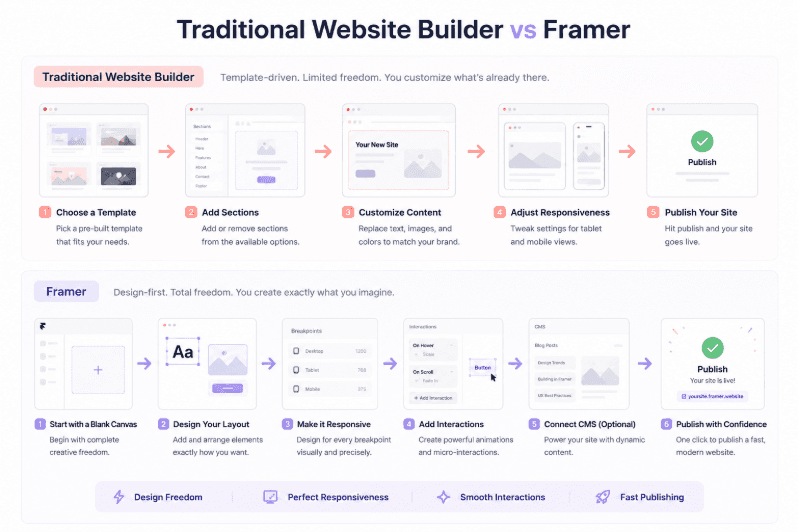
Many traditional website builders organize the experience around a predefined website structure. You select a template or section, then customize it.
Framer puts a much more flexible visual canvas at the center.
You can work directly with typography, spacing, layout, components, breakpoints, responsive behavior, interactions, and animation. Framer's documentation describes layouts built with reusable components, stacks, breakpoints, variants, and variables.
That changes the mental model.
Instead of thinking:
“Which website section should I insert?”
You can think:
“What should this interface look and behave like?”
That difference is subtle, but it has a major effect on the experience.
Designers are accustomed to working spatially. They move objects, adjust spacing, change hierarchy, create reusable components, and explore different visual directions.
Framer lets those design decisions remain close to the production website instead of treating design as a separate stage before development.
Framer Started With Design, Not Traditional Website Building
The history explains almost everything about Framer's personality as a product.
Framer says it started in 2015 around high-fidelity design and prototyping. Its founders later recognized that the product could potentially move beyond prototypes and build actual production websites. That strategic shift became an important part of Framer's evolution.
Independent reporting tells a similar story. Forbes described Framer as a prototyping product that later evolved toward helping designers and marketers create actual websites without the traditional developer handoff.
That history still shows up in the interface.
Framer's vocabulary is unusually design-oriented for a website platform.
You work with components.
You think about variants.
You design responsive breakpoints visually.
You create interactions.
You preview animations.
You refine the composition directly on a canvas.
The website builder came from the design tool rather than the other way around.
That is probably the simplest explanation for why Framer feels different.
What Can You Actually Build With Framer?
Framer is particularly well suited to websites where visual presentation matters.
Marketing websites
Marketing sites are one of the strongest use cases because teams can move quickly from visual concept to production. Framer itself highlights business sites and marketing pages as core website-building use cases.Startup websites
Startups often need to change pages quickly as positioning evolves. Framer's visual editing workflow can make that iteration faster without requiring every design change to go through a separate engineering workflow.SaaS websites
SaaS marketing websites benefit from reusable components, responsive layouts, CMS content, animations, forms, analytics, and SEO controls.Landing pages
Framer is especially comfortable when the goal is to create a highly art-directed landing page where spacing, typography, motion, and visual hierarchy matter.Portfolio websites
The design-first workflow is a natural fit for designers, photographers, creative developers, and studios that want the website itself to demonstrate their visual thinking.Agency websites
Agencies can use reusable components and CMS-driven structures to build polished websites without rebuilding every page from scratch.Blogs and content sites
Framer's CMS supports collection-based content and dynamic pages, making it suitable for blogs, resources, case studies, directories, projects, and other structured content.
It is less useful to think of Framer as “a tool for pretty landing pages.”
It is better understood as a platform for design-led websites that also need to behave like real websites.
How Framer's Visual Canvas Changes Website Building
Consider the difference between two workflows.
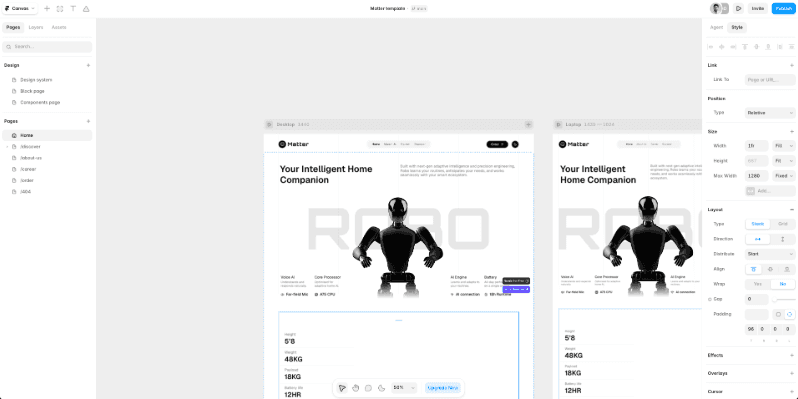
Traditional website-builder workflow
Choose a template.
Select a section.
Replace the content.
Adjust a few settings.
Repeat.
This workflow is efficient when the predefined structure is close to what you want.
Framer workflow
Start with a visual composition.
Define the layout.
Create reusable components.
Set responsive behavior.
Add interactions.
Connect content.
Configure SEO.
Publish.
The difference is not that Framer has eliminated structure. It is that the structure is much more directly controlled by the designer.
The canvas can be used for exploration as well as production work, while the actual published web pages remain distinct from private design pages.
That makes Framer feel less like filling in a website template and more like building the interface itself.
Framer Is More Than Drag and Drop
“Drag and drop” is an incomplete description of what modern visual website building can be.
Framer's layout system includes stacks, grids, components, variants, variables, breakpoints, and responsive behavior. Components can be designed to adapt across desktop, tablet, and mobile layouts.
Animation is another major difference.
Framer provides visual animation and interaction controls, while developers can go further with React-based code components and code overrides. Its animation system supports interactions such as hover, tap, drag, and layout animation.
That creates a useful middle ground:
No-code where possible. Code when necessary.
It is much closer to visual development than the stereotype of a basic website builder.
Does Framer Require Coding?
For many normal websites, no.
You can create pages, layouts, components, responsive behavior, animations, CMS content, SEO settings, and publish a site without writing traditional application code.
But “no-code” should not be confused with “code is impossible.”
Framer supports custom code, JavaScript, custom CSS, third-party scripts, React-based code components, and developer-oriented extensions. Code components are React components that can render on the canvas, in preview, and on the published site.
That distinction matters.
A marketing website and a complex web application are two very different problems.
Framer can remove a huge amount of coding from website creation, but that does not mean it replaces software engineering for every type of digital product.
Framer CMS: Why It Matters
A website builder becomes much more useful when content can grow independently from page design.
That is the role of Framer CMS.
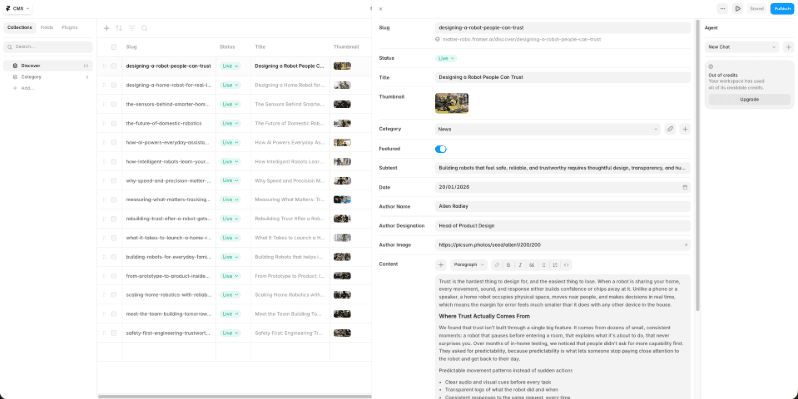
You can create collections for things such as blog posts, resources, case studies, projects, team members, or directories. Framer can then generate CMS pages from collection content using reusable templates.
This changes the product from a static page editor into a content-driven website platform.
Imagine a case-study website.
Instead of manually designing 30 almost-identical pages, you can create one visual CMS template and connect each case study to it.
The content changes.
The design system remains consistent.
That is a fundamental CMS pattern, and it is one of the reasons calling Framer only a “design tool” no longer makes sense.
Framer SEO and Website Publishing
Framer also covers the less glamorous parts of running a real website.
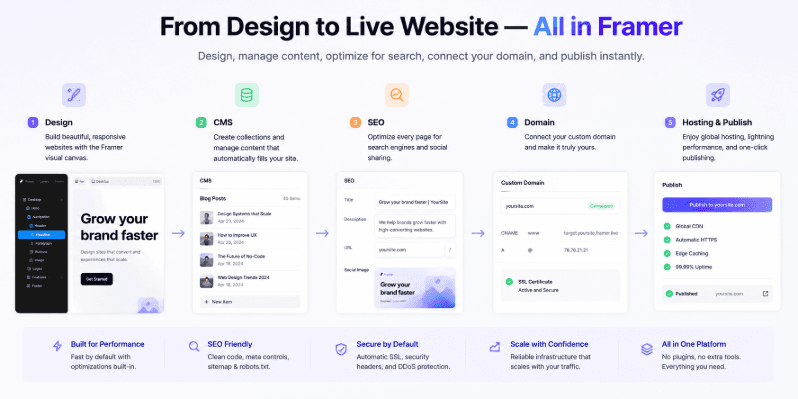
Its current SEO tools include custom page titles and descriptions, CMS metadata, automatically generated sitemaps and robots.txt, indexing controls, redirects, canonical URLs, semantic tags, structured-data support, and analytics integrations.
Framer can also integrate Google Analytics and supports custom code for third-party tracking, structured data, and other site-level additions.
Publishing is handled inside the platform as well.
You can publish to a Framer domain or connect a custom domain. Framer manages SSL certificates and provides hosting infrastructure, while DNS configuration remains with the domain provider.
But there is an important SEO distinction:
Having SEO controls is not the same as guaranteeing SEO results.
Framer can provide the technical mechanisms. Ranking still depends on content quality, relevance, authority, internal linking, user experience, competition, search intent, and many other factors.
That distinction applies to every website platform.
How AI Changes the Framer Website Builder
AI has made the “website builder” category even broader.
Framer's June 2026 Framer 3.0 release introduced Agents that work directly on the canvas. They can help design pages, iterate layouts, add effects, create components, write code, connect to CMS content, work with analytics, and organize styles.
This is an important evolution because the AI is not simply generating a website and handing you a static result.
It operates inside the design environment.
That means the workflow can become:
Prompt → generate → inspect → edit → refine → publish.
But Framer's own positioning is telling here: the company describes agents as working alongside the designer. The human still supplies judgment, taste, direction, and review.
That makes AI an acceleration layer rather than a replacement for design thinking.
Framer vs Traditional Website Builders
A useful way to think about the differences is this:
Area | Framer | Traditional website builders |
Design freedom | Very high visual control | Often structured around templates or predefined sections |
Ease of use | Accessible to designers, but deeper than basic drag-and-drop | Often optimized for beginners |
Animation | Strong visual interaction and animation workflow | Usually more constrained |
Responsive design | Detailed breakpoint and layout control | Often simplified |
CMS | Built-in CMS with visual templates | Common on mature platforms |
SEO | Strong built-in technical controls | Typically built in |
Hosting | Integrated | Usually integrated |
Customization | Visual components plus code options | Varies widely |
Learning curve | Moderate; deeper control means more to learn | Often shorter for simple sites |
Best suited for | Design-led marketing and content websites | Beginners to businesses needing predefined workflows |
This is not an argument that Framer is universally better.
Wix emphasizes ease, bundled hosting, templates, AI, SEO, and business functionality for a broad audience. Squarespace similarly combines design templates, an editor, AI tools, hosting, CMS functionality, and SEO.
The difference is the balance between freedom and abstraction.
Traditional builders often hide more of the underlying system.
Framer exposes more of the design system.
Framer vs Webflow: Why the Comparison Matters
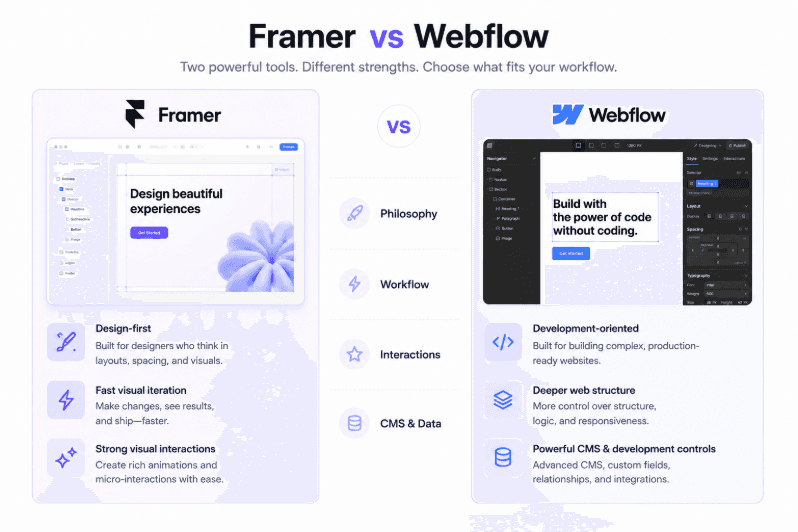
Webflow is one of the closest alternatives to Framer, with both offering powerful visual website-building workflows.
Framer feels more design-first, while Webflow leans more toward visual development, structured layouts, CMS, and developer control. Both can serve designers and developers, so the better choice depends on your workflow and project.
If you want a detailed Framer vs Webflow comparison, covering design, CMS, SEO, animations, customization, pricing, and more, check out our dedicated Framer vs Webflow guide.
The right choice depends on the website, not the popularity contest.
Is Framer a No-Code Website Builder?
Yes, for many website projects.
No, if “no-code” means that no project can ever involve code.
That distinction is important.
You can build a professional marketing website entirely through Framer's visual tools. But advanced projects can involve code components, external APIs, third-party scripts, custom JavaScript, CSS, or other integrations.
So the more accurate description is:
Framer is a no-code website builder with an escape hatch into code.
That is much more useful than claiming it eliminates development entirely.
The Limitations of Framer
Framer's strengths also point toward its limitations.
A platform optimized around visual website creation is not automatically the best foundation for every software problem.
Framer may be a less natural choice when the core requirement is a highly complex web application with extensive backend logic, custom infrastructure, or application architecture that needs to be controlled at a lower technical level.
It can also be less suitable when a project has unusual requirements around large-scale content architecture or highly specialized ecommerce and backend systems.
The same principle applies to code.
Framer supports React-based code components and external integrations, but introducing more custom engineering also means you move farther from the simplicity that makes the platform attractive in the first place. Framer's documentation itself places constraints around how custom code interacts with certain CMS internals, reflecting the trade-off between extensibility, stability, and platform-managed behavior.
In other words, Framer works best when the website is still fundamentally a website, rather than a software application disguised as one.
Who Should Use Framer?
Designers
Probably the clearest audience.
Framer preserves the visual language of design tools while producing a real website.Freelancers
Freelancers can move from design to launch without requiring a separate development handoff for many projects.Agencies
Reusable components, CMS templates, responsive systems, and centralized publishing make Framer practical for repeatable client workflows.Startups
Startups can iterate marketing websites quickly while keeping design and publishing in the same workflow.Marketing teams
Teams can manage pages, content, SEO, analytics, and experiments without depending on engineering for every small change.Founders
For founders who need to get a polished site online quickly, Framer can provide a relatively direct path from idea to published website.Developers
Developers can use Framer when the project benefits from visual development but still needs custom code or React components.
The common thread is not job title.
It is the desire to control the website visually without separating design and production too aggressively.
Who Should Probably Choose Something Else?
Some projects simply belong elsewhere.
Complex ecommerce may benefit from a specialized commerce platform.
Highly interactive web applications may be better served by a code-first stack.
Large enterprise content systems may require a CMS architecture designed specifically around extreme content scale or composability.
And projects requiring complete control over hosting, infrastructure, backend systems, and application architecture may be better suited to custom development.
WordPress, for example, is fundamentally a CMS with a huge plugin ecosystem, giving organizations significant flexibility to extend the platform for different needs.
The goal is not to find the “best website builder.”
It is to find the platform whose trade-offs fit the project.
So Why Do People Call Framer a Website Builder?
Because it does the job of a website builder.
You can use Framer to design pages, structure a site, create responsive layouts, manage content, configure SEO, add analytics, connect domains, host the site, and publish it.
That is enough to qualify.
What makes Framer different is the philosophy behind those capabilities.
Traditional website builders often start with the question:
“How can we make website creation easier?”
Framer starts closer to:
“How can we make designing the website itself feel natural?”
That difference explains almost everything.
Framer does not ask designers to leave their visual mindset at the door.
It turns that mindset into the production workflow.
Final Verdict
So, is Framer a website builder?
Yes.
Calling it only a website builder, however, misses the most interesting part.
Framer is a design-first website builder that has grown into a broader visual development platform. Its roots in high-fidelity prototyping explain why the editor feels familiar to designers, while its CMS, SEO, hosting, analytics, publishing, code capabilities, and AI agents make it capable of producing and maintaining real websites.
That is why the label can feel contradictory at first.
Framer looks like a design tool.
It behaves like a website builder.
And increasingly, it sits somewhere in between.


